Choosing Windows edition
There are 2 editions I want to mention:
| Edition | Pros | Cons |
|---|---|---|
| Consumer (Home, Pro, …) | Widely supported, latest features | Comes with ads, telemetry, shorter support lifecycle |
| LTSC / IoT LTSC | Minimal bloat, no forced feature updates, support up to 10 years | Latest Windows 10 build is only 21H2 (some apps now require 22H2) |
- If your software runs fine on old builds, go with IoT LTSC. Otherwise, stick with Consumer and debloat it manually.
Btw, you can get these Windows editions here: massgrave.dev
OOBE setup
Do not connect to the Internet yet.
- If there’s no “I don’t have Internet” option, press
Shift + F10and run:
Windows will reboot and show the offline setup option.oobe\bypassnro
- If there’s no “I don’t have Internet” option, press
Skip Microsoft account login if you want a clean local user, and don’t want to fuck up your user folder.
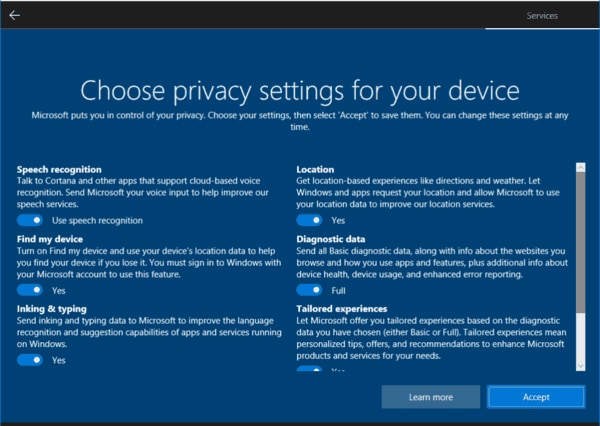
On privacy settings screen, disable all options.
Post-installation tweaks
Remove unnecessary apps
- Go to Apps -> Installed apps: uninstall apps that you don’t need
- Open Powershell (Admin) and type these commands to remove UWP apps quickly
# Your Phone / Phone Link
Get-AppxPackage *Microsoft.YourPhone* | Remove-AppxPackage

# Get Help
Get-AppxPackage *Microsoft.GetHelp* | Remove-AppxPackage

# Tips
Get-AppxPackage *Microsoft.Tips* | Remove-AppxPackage

# Groove Music
Get-AppxPackage *ZuneMusic* | Remove-AppxPackage

# News / Weather / Finance / Sports
Get-AppxPackage *Microsoft.BingNews* | Remove-AppxPackage
Get-AppxPackage *Microsoft.BingWeather* | Remove-AppxPackage
Get-AppxPackage *Microsoft.BingSports* | Remove-AppxPackage
Get-AppxPackage *Microsoft.BingFinance* | Remove-AppxPackage

# Xbox
Get-AppxPackage *XboxApp* | Remove-AppxPackage
Get-AppxPackage *Xbox.TCUI* | Remove-AppxPackage
Get-AppxPackage *XboxIdentityProvider* | Remove-AppxPackage
Get-AppxPackage *XboxGamingOverlay* | Remove-AppxPackage

# Skype / Teams
Get-AppxPackage *SkypeApp* | Remove-AppxPackage
Get-AppxPackage *MicrosoftTeams* | Remove-AppxPackage

# Remove for all existing + future users (provisioned packages)
Get-AppxProvisionedPackage -Online |
Where-Object DisplayName -match "Xbox|YourPhone|Skype|ZuneMusic|GetHelp|Tips|BingNews|BingWeather|BingSports|BingFinance" |
Remove-AppxProvisionedPackage -Online
Remove Microsoft Edge
- Use ShadowWhisperer/Remove-MS-Edge
- Open Powershell (Admin) and type these commands
reg add "HKLM\SOFTWARE\Microsoft\EdgeUpdate" /v DoNotUpdateToEdgeWithChromium /t REG_DWORD /d 1 /f
schtasks /Change /TN "MicrosoftEdgeUpdateTaskMachineCore" /Disable
schtasks /Change /TN "MicrosoftEdgeUpdateTaskMachineUA" /Disable
Disable unnecessary services, features and telemetry
Open Powershell (Admin) and type these commands
Stop-Service "SysMain" -Force
Set-Service "SysMain" -StartupType Disabled
Stop-Service "DiagTrack" -Force
Set-Service "DiagTrack" -StartupType Disabled
Set-Service "BthAvctpSvc" -StartupType Manual
Stop-Service "TrkWks" -Force
Set-Service "TrkWks" -StartupType Disabled
Stop-Service "MapsBroker" -Force
Set-Service "MapsBroker" -StartupType Disabled
Set-Service "Fax" -StartupType Manual
Stop-Service "fhsvc" -Force
Set-Service "fhsvc" -StartupType Disabled
Set-Service "LanmanServer" -StartupType Manual
Stop-Service "wisvc" -Force
Set-Service "wisvc" -StartupType Disabled
Stop-Service "workfolderssvc" -Force
Set-Service "workfolderssvc" -StartupType Disabled
Stop-Service "XboxGipSvc" -Force
Set-Service "XboxGipSvc" -StartupType Disabled
Stop-Service "XblAuthManager" -Force
Set-Service "XblAuthManager" -StartupType Disabled
Stop-Service "XblGameSave" -Force
Set-Service "XblGameSave" -StartupType Disabled
Stop-Service "XboxNetApiSvc" -Force
Set-Service "XboxNetApiSvc" -StartupType Disabled
Stop-Service WerSvc -Force
Set-Service WerSvc -StartupType Disabled
Stop-Service lfsvc -Force
Set-Service lfsvc -StartupType Disabled
Stop-Service RetailDemo -Force
Set-Service RetailDemo -StartupType Disabled
Stop-Service dmwappushservice -Force
Set-Service dmwappushservice -StartupType Disabled

reg add "HKLM\SOFTWARE\Policies\Microsoft\Windows\DataCollection" /v AllowTelemetry /t REG_DWORD /d 0 /f
reg add "HKLM\SOFTWARE\Policies\Microsoft\Windows\CloudContent" /v DisableWindowsConsumerFeatures /t REG_DWORD /d 1 /f
reg add "HKLM\SOFTWARE\Policies\Microsoft\Windows\CloudContent" /v DisableTailoredExperiencesWithDiagnosticData /t REG_DWORD /d 1 /f
reg add "HKLM\SOFTWARE\Microsoft\Windows\CurrentVersion\DeliveryOptimization\Config" /v DODownloadMode /t REG_DWORD /d 0 /f
reg add "HKCU\Software\Microsoft\Siuf\Rules" /v NumberOfSIUFInPeriod /t REG_DWORD /d 0 /f
reg add "HKCU\Software\Microsoft\Siuf\Rules" /v PeriodInNanoSeconds /t REG_QWORD /d 0 /f
reg add "HKCU\Software\Microsoft\Windows\CurrentVersion\AdvertisingInfo" /v Enabled /t REG_DWORD /d 0 /f
reg add "HKCU\Software\Microsoft\Windows\CurrentVersion\Privacy" /v TailoredExperiencesWithDiagnosticDataEnabled /t REG_DWORD /d 0 /f
reg add "HKCU\Software\Microsoft\Windows\CurrentVersion\BackgroundAccessApplications" /v GlobalUserDisabled /t REG_DWORD /d 1 /f
reg add "HKCU\Software\Policies\Microsoft\Windows\Explorer" /v DisableSearchBoxSuggestions /t REG_DWORD /d 1 /f
reg add "HKLM\SOFTWARE\Policies\Microsoft\Windows\Windows Error Reporting" /v Disabled /t REG_DWORD /d 1 /f
reg add "HKLM\SOFTWARE\Policies\Microsoft\Windows\Windows Search" /v DisableWebSearch /t REG_DWORD /d 1 /f
reg add "HKLM\SOFTWARE\Policies\Microsoft\Windows\Windows Search" /v ConnectedSearchUseWeb /t REG_DWORD /d 0 /f
reg add "HKCU\Software\Microsoft\Windows\CurrentVersion\ContentDeliveryManager" /v RotatingLockScreenEnabled /t REG_DWORD /d 0 /f
reg add "HKCU\Software\Microsoft\Windows\CurrentVersion\ContentDeliveryManager" /v RotatingLockScreenOverlayEnabled /t REG_DWORD /d 0 /f

schtasks /Change /TN "\Microsoft\Windows\Application Experience\Microsoft Compatibility Appraiser" /Disable
schtasks /Change /TN "\Microsoft\Windows\Application Experience\ProgramDataUpdater" /Disable
schtasks /Change /TN "\Microsoft\Windows\Customer Experience Improvement Program\Consolidator" /Disable
schtasks /Change /TN "\Microsoft\Windows\Customer Experience Improvement Program\UsbCeip" /Disable
schtasks /Change /TN "\Microsoft\Windows\DiskDiagnostic\Microsoft-Windows-DiskDiagnosticDataCollector" /Disable

Disable-WindowsOptionalFeature -Online -FeatureName Internet-Explorer-Optional-amd64 -NoRestart
Disable-WindowsOptionalFeature -Online -FeatureName WorkFolders-Client -NoRestart
Disable-WindowsOptionalFeature -Online -FeatureName Printing-XPSServices-Features -NoRestart
Disable indexing for C:\
- Open File Explorer
- Right click on
C:\-> Properties - Untick Allow files on this drive to have contents indexed in addition to file properties
- Choose Apply changes to drive C:\ , subfolders and files
- Choose Ignore all if there are any errors
Disable visual effects
- Search View advanced system settings
- Go to Performance > Settings
- Choose Adjust for best performance
- Enable Show thumbnails instead of icons
Misc tweaks
Open Powershell (Admin) and type these commands
# Disable startup delay
reg add "HKCU\Software\Microsoft\Windows\CurrentVersion\Explorer\Serialize" /v StartupDelayInMSec /t REG_DWORD /d 0 /f

# Disable AutoPlay/AutoRun (for better security)
reg add "HKLM\SOFTWARE\Microsoft\Windows\CurrentVersion\Policies\Explorer" /v NoDriveTypeAutoRun /t REG_DWORD /d 255 /f
reg add "HKCU\Software\Microsoft\Windows\CurrentVersion\Policies\Explorer" /v NoDriveTypeAutoRun /t REG_DWORD /d 255 /f

# Disable Fullscreen optimizations for all apps
setx __COMPAT_LAYER "DISABLEDXMAXIMIZEDWINDOWEDMODE HIGHDPIAWARE" /m
Recommended software alternatives
After cleaning Windows, you’ll probably want to replace Microsoft’s built-in apps with lighter and better alternatives:
| Category | Built-in app | Alternative |
|---|---|---|
| Browser | Microsoft Edge | Helium, Brave |
| Office | Microsoft 365 (trial nags) | LibreOffice |
| Media player | Movies & TV / Groove Music | VLC, MPV, MPC-HC, Foobar2000 |
| Photos | Photos app (slow, ads) | ImageGlass, IrfanView, nomacs |
| Notepad | Notepad / WordPad | Classic Notepad, Notepad++ |
| Compression | Built-in zip (limited) | 7-Zip, PeaZip, Nanazip |
| App Store | Microsoft Store | Chocolatey, Winget (package managers) |
Installing Microsoft Store & winget on LTSC
LTSC 2021 and newer
- Open Powershell (Admin)
- Type
wsreset -i
- Open MS Store and update App Installer
